

E-commerce integration with venue tours is the process of embedding booking, pricing, and purchasing capabilities directly into virtual tour experiences, transforming passive exploration into active transactions. For event planners, tourism professionals, and venue owners, this integration is no longer optional. Platforms like WooCommerce, Shopify, and Simple Virtual Tour now make it practical to connect a 360-degree walkthrough directly to a live booking engine, so a prospect who falls in love with your ballroom can reserve it before they close the tab. This guide covers the technical foundations, interface strategies, platform comparisons, and optimization tactics you need to make that happen.
How e-commerce integrates with venue tours: the core architecture
The technical term for this process is "commerce-enabled virtual tour," and understanding its architecture prevents the most common and costly mistakes venues make when going digital.
The foundation is a booking and inventory layer that sits behind the tour interface. This layer manages four critical functions: real-time availability, dynamic pricing, booking creation, and post-booking workflows like confirmations, voucher delivery, and cancellations. A complete API integration for tours and activities must handle all of these functions, not just the front-end display. Without this layer, your tour becomes a brochure with a phone number.

Real-time synchronization is the system of record that prevents overbooking and pricing errors. When a venue's Saturday evening slot is reserved through one channel, every other channel, including the virtual tour, must reflect that change instantly. OTA integration best practices treat inventory truth as the system of record and the tour UI as presentation only. That distinction matters because it clarifies where each technical component belongs in your stack.
A critical and often overlooked requirement is stateful data passing. When a visitor selects a date, a guest count, and a specific event space inside the tour, those user selections must carry through to the booking form or cart without requiring manual re-entry. Every extra field a user has to fill in again is a drop-off point.
Here is what a complete integration layer must include:
- Product search and filtering by date, capacity, and space type
- Live pricing and availability pulled from the booking engine, not hardcoded
- Booking creation and confirmation with automated voucher or contract delivery
- Cancellation and modification handling tied to the same inventory record
- Customer support routing so post-booking questions reach the right team
Pro Tip: Never treat the virtual tour itself as the booking system. The tour is the presentation layer. Your booking engine, whether that is WooCommerce with WooTours, a property management system, or a dedicated reservations platform, is the system of record.
How does UI design drive conversions inside venue tours?
A virtual tour that ends with no next step is a dead end. Conversion-first tour design treats the tour as an active sales tool, not a passive showcase, and the difference in booking rates is significant.
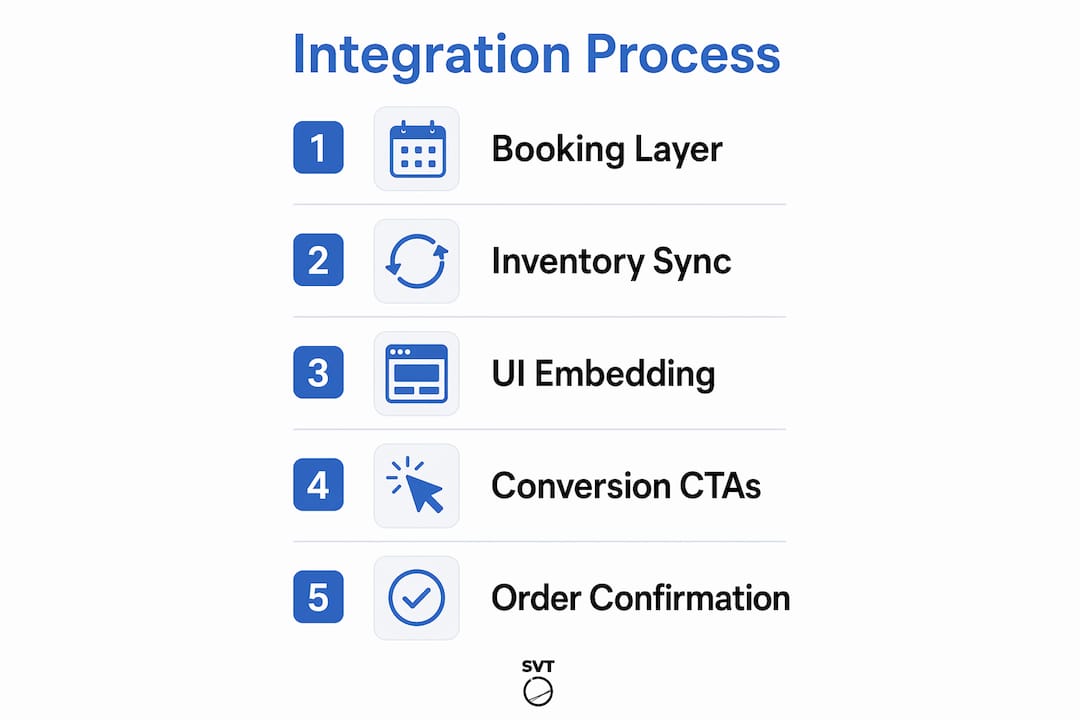
The most effective UI pattern uses persistent calls to action embedded directly inside the tour interface. Buttons like "Check Availability," "Get Pricing," and "Book a Site Visit" should appear at every logical decision point, not just at the end of the tour. When a prospect is standing virtually in your rooftop terrace and sees a capacity of 120 guests with a "Check Availability" button right there, the path to booking is frictionless.
Pricing transparency embedded inside the tour is equally important. Itemized pricing and fee data displayed directly within the tour experience builds trust and removes the friction of navigating to a separate pricing page. Tour24's integration with Engrain demonstrates this with all-in pricing visibility inside self-guided tours, so prospects see the full cost at the moment they are most engaged.
Here is a proven sequence for structuring your tour's conversion flow:
- Open with the most impressive space. First impressions set the emotional tone and determine whether a visitor continues exploring.
- Add hotspot CTAs at peak-interest moments. Place "Get Pricing" buttons on the spaces most frequently viewed, identified through your analytics.
- Embed a capacity and pricing summary in each room's info panel so visitors can self-qualify without leaving the tour.
- Connect every CTA to a live booking form or inquiry flow, not a static contact page. Static pages break momentum.
- Close with a persistent booking widget that stays visible regardless of which space the visitor is currently viewing.
"360 virtual tours with fixed CTAs and pricing hotspots convert more qualified leads and shorten booking cycles." — Invision Studio
The logic here is straightforward. A visitor who has spent four minutes exploring your venue is far more qualified than one who just landed on your homepage. Giving that visitor a direct path to booking captures intent at its peak.
Which e-commerce platform fits your venue tour setup?
The right platform depends on your venue's business model, technical capacity, and the complexity of your booking requirements. The three most common approaches each have distinct strengths.
| Platform approach | Best for | Key strength | Main limitation |
|---|---|---|---|
| WordPress + WooCommerce + WooTours | Independent venues with direct booking needs | Full control, plugin ecosystem, AI chat integration | Requires technical setup and maintenance |
| Shopify with 3D/tour modules | Venues selling packages or merchandise alongside tours | Native cart and checkout, 3D configurator sync | Less flexible for complex booking logic |
| AI assistant + messaging handoff | Markets where WhatsApp or SMS drives more revenue than web checkout | High lead qualification, personal touch | Requires human sales team for completion |
| Dedicated booking platform API | High-volume venues or multi-location operators | Real-time inventory, enterprise-grade reliability | Higher cost, longer integration timeline |
The WordPress plus WooCommerce plus WooTours stack is the most widely adopted approach for independent venues. A direct-booking tourism stack built on this combination can outperform online travel agencies on margin by eliminating commission fees, and it gives you full ownership of the customer relationship.
Shopify's approach is worth considering if your venue sells physical add-ons alongside tour bookings, such as catering packages, decoration bundles, or branded merchandise. The platform's 3D module integrations sync selections directly to the shopping cart, so a client who chooses a specific room configuration can add a catering package in the same checkout flow.
AI-powered assistants represent the most underused option in venue e-commerce. AI chat bots that qualify leads during the tour interaction and route hot prospects to a human sales agent via WhatsApp have shown higher conversion rates in markets where messaging apps dominate over web forms. This approach works especially well for high-value corporate event bookings where a personal conversation closes the deal.
Best practices for optimizing your venue tour e-commerce setup
Getting the integration live is step one. Getting it to perform is the ongoing work, and these practices separate venues that see a lift in bookings from those that see no change.
- Place your tour prominently on high-traffic pages. Embedding tours near the top of room or space pages, with action-led buttons alongside, keeps visitor momentum toward booking rather than letting them drift to competitor sites.
- Instrument every interaction. Tracking hotspot clicks and CTA usage inside your tour tells you which spaces generate the most interest and which offers convert best. Use that data to refine your layout and pricing presentation quarterly.
- Prioritize mobile optimization. More than half of venue research now happens on mobile devices. A tour that loads slowly or displays CTAs that are too small to tap on a phone loses bookings before the visitor even sees your best space. The mobile experience for tours directly affects your conversion rate.
- Promote your tour across multiple channels. Your Google Business Profile, Instagram, and LinkedIn company page should all link directly to the tour, not just your homepage. A prospect who arrives at the tour from a social post is already interested. Make the path to booking as short as possible.
- Run iterative A/B tests on CTA placement and copy. "Book a Site Visit" and "Check Availability" are not interchangeable. One may outperform the other for your specific audience. Test both over 30-day periods and let the data decide.
Pro Tip: Use heatmap tools like Hotjar or Microsoft Clarity alongside your tour analytics. Heatmaps show you where visitors pause and click on the page surrounding your embedded tour, which reveals whether your booking CTA placement is working or getting ignored.
Key takeaways
E-commerce integration with venue tours works when a reliable booking engine manages inventory in real time and the tour interface carries user selections directly into the commerce layer without friction.
| Point | Details |
|---|---|
| Booking layer is non-negotiable | The tour is presentation only; your booking engine must manage availability, pricing, and confirmations. |
| Persistent CTAs convert browsers | Embed "Check Availability" and "Get Pricing" buttons at peak-interest moments inside the tour, not just at the end. |
| Pricing transparency builds trust | Display itemized, all-in pricing inside the tour experience to reduce friction at the decision point. |
| Platform choice depends on your model | WooCommerce suits direct booking; Shopify fits package sales; AI assistants work best for high-value conversions. |
| Analytics drive improvement | Track hotspot clicks and CTA usage to identify which spaces and offers convert best, then optimize accordingly. |
Why most venues are still leaving bookings on the table
I have reviewed dozens of venue websites where a beautifully produced virtual tour sits on a page with no booking link, no pricing, and no CTA anywhere in sight. The tour does its job perfectly. It shows the space in the best possible light. And then it ends, and the visitor has nowhere to go except a generic contact form. That is not a technology problem. It is a design philosophy problem.
The venues that convert best treat the virtual tour as the opening move in a sales conversation, not the final product. They understand that a prospect who has spent time inside a virtual tour is warmer than almost any other lead source. The integration work, connecting that tour to a live booking engine, embedding pricing at the right moments, and routing qualified leads to the right follow-up, is what turns that warmth into revenue.
The technical complexity is real but manageable. A self-hosted venue tour platform gives you the control to connect your tour to your existing booking stack without depending on a third-party cloud service. For venues with specific data requirements or existing enterprise systems, that control matters. For smaller operators, a cloud-hosted solution with built-in e-commerce features gets you to market faster.
What I consistently tell venue owners is this: start with one space, one CTA, and one booking flow. Measure it for 60 days. The data will tell you exactly where to invest next.
— Andrea
How Simple Virtual Tour supports venue e-commerce integration
Simple Virtual Tour gives event planners and venue owners the tools to build unlimited interactive virtual tours with embedded CTAs, booking links, and pricing panels, all without needing a development team.
The platform's e-commerce integration features let you connect your tour directly to your booking workflow, so visitors move from exploring your space to confirming a reservation in a single session. With live session capabilities and an intuitive backend, Simple Virtual Tour supports both cloud-hosted and self-hosted deployments, giving you full control over your data and costs. If you are ready to turn your virtual tours into a direct booking channel, explore Simple Virtual Tour and see how over 1,400 venues and tourism professionals are already doing it.
FAQ
What does e-commerce integration in venue tours actually mean?
E-commerce integration in venue tours means connecting a virtual tour experience to a live booking engine, pricing display, and transaction flow so visitors can check availability and book directly from within the tour.
What is the most common mistake venues make with tour integration?
The most common mistake is using the virtual tour itself as the booking system. The tour is a presentation layer; a dedicated booking engine must manage inventory, pricing, and confirmations to avoid overbooking and broken checkout experiences.
Which platform is best for venue tour booking systems?
WordPress with WooCommerce and a tour booking plugin like WooTours is the most flexible option for direct bookings. Shopify works well for venues selling packages alongside tours, while AI-assisted chat handoffs suit high-value corporate bookings.
How do I sell venue tours online and drive more conversions?
Embed persistent CTAs like "Check Availability" and "Get Pricing" directly inside the tour interface, display itemized pricing at decision points, and connect every CTA to a live booking form rather than a static contact page.
How important is mobile optimization for venue tour e-commerce?
Mobile optimization is critical. A significant share of venue research happens on mobile devices, and tours that load slowly or display unresponsive CTAs lose bookings before the visitor reaches your best spaces.