

Virtual tours are immersive digital environments that communicate venue ambiance by replicating spatial flow, lighting, and brand atmosphere in a way that static photography cannot. Understanding how virtual tours communicate venue ambiance is the starting point for any venue professional who wants to convert remote prospects into confident, committed clients. Platforms like Matterport and services like Momentum 360 have demonstrated that interactive walk-throughs shift client conversations from "what does it look like?" to "how do we configure it?" That shift shortens the sales cycle and increases booking confidence. When your digital presentation matches the physical experience, trust follows.
How virtual tours use spatial navigation to convey venue layout
The technical foundation of a strong virtual tour venue experience is 360-degree capture at eye level, typically using a tripod-mounted camera. This positioning simulates the human perspective and gives viewers an accurate sense of ceiling height, room depth, and sightlines. Venues report that interactive walk-throughs shift client focus to logistics and customization, shortening lead qualification significantly. That means fewer back-and-forth emails and faster decisions from event planners.
Multi-modal navigation takes this further by combining three distinct view types:
- Walkthrough mode: The viewer moves through the space at ground level, experiencing the natural flow from entrance to main hall to breakout rooms.
- Zone-based menus: Labeled navigation points let users jump directly to specific areas, such as the catering kitchen, outdoor terrace, or AV booth.
- 3D dollhouse view: A bird's-eye rendering of the entire venue gives planners an instant spatial overview, which is particularly useful for seating configuration planning in theater or banquet layouts.
Multi-modal navigation with interactive hotspots provides critical planning data such as room capacities and AV infrastructure, and its use on room pages significantly increases conversion rates compared to static images. The data point matters because it connects navigation design directly to revenue outcomes.
Pro Tip: Avoid navigation fatigue by limiting your top-level menu to five or fewer zones. Use descriptive labels like "Main Ballroom" or "Rooftop Terrace" rather than generic labels like "Room 1" or "Area A." Clear labels reduce cognitive load and keep visitors engaged longer.

Lighting technique also plays a defining role here. HDR bracketing and documenting live event setups are critical for conveying authentic ambiance, because underexposed or empty-room images degrade perception. Capturing a venue during an actual event, complete with table settings, lighting rigs, and guests, communicates energy that an empty room simply cannot.
How virtual tours communicate brand personality online
Communicating atmosphere through virtual tours goes beyond showing the physical space. It requires embedding your brand identity into every design decision within the tour itself. Logos, color palettes, and curated navigation menus should align with your existing marketing materials so that the tour feels like a natural extension of your website, not a separate product.
The academic field of semiotics offers a useful framework here. Consistent brand identity in virtual tours increases visitor trust and supports long-term relationships, because spatial layout and interaction cues form what researchers call a "brandscape." Brands like Nike and Gucci have used branded VR environments to demonstrate how immersive spatial design can carry emotional and cultural meaning far beyond a logo placement. The same principle applies to a boutique hotel or a corporate event venue.
Tone of voice consistency matters just as much as visual design. Welcome messages, hotspot labels, and pop-up descriptions should all reflect the same voice your brand uses in email campaigns and social media. Aligning virtual tour design choices such as voice, titles, music, and visual elements with established brand style enhances visitor trust and creates a cohesive client experience. A luxury venue that uses casual, abbreviated labels in its tour sends a mixed signal to high-end clients.
Interactive hotspots are the most direct tool for expressing brand personality within the tour itself. You can embed:
- Team introduction videos that put a human face on the venue and build immediate rapport.
- Event atmosphere clips showing past weddings, conferences, or concerts in the actual space.
- Product or service details such as catering menus, AV package options, or accessibility features.
Pro Tip: Update your tour content at least twice a year, or immediately after any renovation. Outdated tours that show old decor or removed features actively damage brand credibility. Freshness signals professionalism.
How virtual tours enhance ambiance through multi-sensory features
The most significant gap between a photograph and an immersive venue tour is sensory depth. Audio cues and ambient soundscapes transform a visual-only virtual tour into a multi-sensory experience, emotionally resonating with viewers and more accurately communicating ambiance. A cocktail reception area with soft jazz playing in the background communicates something entirely different from the same room shown in silence.
Interactive hotspots with audio and video content deepen this effect further. Human elements such as staff video introductions prevent virtual tours from feeling sterile and increase user connection. When a venue coordinator appears on screen to explain the room's acoustic design or describe a typical setup process, the tour moves from a digital brochure to a genuine conversation starter.
The immersive storytelling benefits of this approach over traditional photographs include:
- Emotional engagement: Viewers form an attachment to the space before they visit, which increases commitment and reduces cancellation rates.
- Operational clarity: Hotspots that explain capacity limits, load-in access, or power outlet locations answer logistical questions without requiring a phone call.
- Authenticity signals: Live event footage and real staff appearances communicate that the venue is active and professionally managed.
Pro Tip: When adding ambient sound, keep the volume low and the audio loop seamless. Jarring audio cuts or overly loud soundscapes distract rather than immerse. Test the experience on both desktop and mobile before publishing.
Humanizing virtual tours with video introductions and live event footage makes venues appear authentic and approachable rather than sterile. This is the single most underused technique in venue digital marketing.
Virtual tours vs. traditional photography for venue ambiance
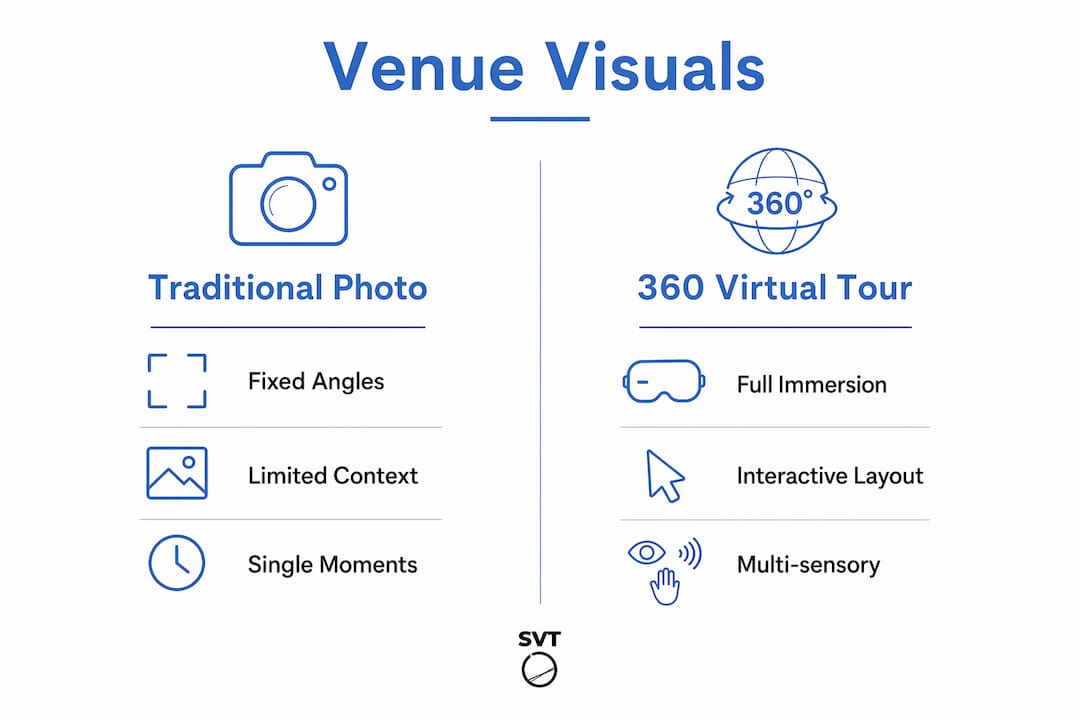
Traditional photography captures isolated moments from fixed angles. A skilled photographer can produce beautiful images, but the viewer must mentally reconstruct the spatial relationships between rooms, which introduces guesswork and uncertainty. Virtual tours eliminate guesswork compared to traditional photos by capturing environments interactively, helping planners focus on operational details and reducing booking delays.
The table below compares the two formats across the dimensions that matter most to venue professionals and their clients.
| Dimension | Traditional photography | 360 virtual tours |
|---|---|---|
| Spatial understanding | Limited to captured angles | Full environment, any direction |
| Lighting representation | Single exposure per shot | HDR multi-exposure, dynamic range |
| Client interaction | Passive viewing | Active navigation and exploration |
| Operational detail | Requires separate documentation | Embedded via interactive hotspots |
| Booking confidence | Moderate, requires site visit | High, reduces need for pre-visit |
| SEO and mobile reach | Standard image optimization | Embeddable, mobile-optimized tours increase engagement |
360 virtual tours outperform traditional photography by capturing entire venues interactively, allowing exploration of layout, lighting variations, and operational details. That said, the two formats work best together. High-quality photographs remain valuable for social media, print collateral, and email campaigns, while virtual tours serve as the decision-making tool that closes the gap between interest and booking.
Best practices for designing tours that showcase venue vibes
Designing a virtual tour that genuinely communicates your venue's character requires planning before you ever set up a camera. Follow this sequence to build a tour that works as hard as your sales team.
- Map the narrative route. Walk the venue as a first-time visitor would and identify the five to eight moments that define the experience. Your tour should follow that same emotional arc, from the entrance impression to the main event space to the supporting amenities.
- Align all elements with brand style. Choose font styles, color overlays, and audio tracks that match your existing brand guidelines. Every design choice either reinforces or contradicts the brand promise you make elsewhere.
- Capture live setups whenever possible. Capturing populated event scenarios is critical to projecting the venue's true ambiance and energy, preventing flat or misleading impressions. Schedule a shoot during an actual event or a styled setup.
- Update content after changes. Regularly updating tours after renovations reflects professionalism and maintains accurate brand perception. An outdated tour is worse than no tour.
- Place strategic hotspots at decision points. Include capacity figures, AV specifications, and accessibility details at the exact locations where planners need that information, not in a separate PDF.
- Optimize for search and mobile. Embed your tour on relevant landing pages, add descriptive alt text and structured data, and verify that the experience loads cleanly on smartphones. The virtual tour customer trust you build online depends on a frictionless first impression.
Pro Tip: Before publishing, ask someone unfamiliar with the venue to navigate the tour and describe what they felt about the space. Their emotional response, not just their ability to find rooms, tells you whether the ambiance is coming through.
Key takeaways
Virtual tours communicate venue ambiance most effectively when spatial navigation, branded design, multi-sensory features, and regularly updated content work together as a single, cohesive client experience.
| Point | Details |
|---|---|
| Spatial navigation drives decisions | Eye-level 360 capture and dollhouse views give planners the spatial clarity they need to commit. |
| Brand identity must be embedded | Logos, color palettes, and consistent tone of voice turn a tour into a brand experience. |
| Multi-sensory features build emotion | Ambient soundscapes and staff video introductions make venues feel active and approachable. |
| Virtual tours outperform static photos | Interactive tours reduce booking delays by eliminating the guesswork that photographs leave behind. |
| Regular updates protect credibility | Outdated tour content signals neglect and actively undermines client trust. |
Why spatial storytelling matters more than visual quality
I have reviewed hundreds of venue virtual tours over the years, and the pattern is consistent: the tours that convert clients are not always the most technically polished. They are the ones that tell a story. A tour that guides you from the lobby through the pre-function space and into the main ballroom, with ambient sound building as you go, communicates something that a perfectly lit but randomly navigable tour never can.
The mistake I see most often is treating the virtual tour as a photography replacement rather than a client experience tool. Venues invest in expensive 360 cameras and then upload empty rooms with no hotspots, no audio, and no brand context. The result is a technically accurate but emotionally inert presentation. Clients leave without a feeling, and without a feeling, there is no urgency to book.
The venues that get this right, particularly in the hospitality and corporate events sectors, treat their virtual tour the same way they treat a site visit. They plan the route, they stage the space, they brief the viewer, and they follow up. The digital and physical experiences reinforce each other rather than competing. If you are investing in virtual reality venue presentations, invest equally in the story you want those presentations to tell.
— Andrea
Create immersive venue tours with Simple Virtual Tour
If you are ready to put these principles into practice, Simple Virtual Tour gives you the tools to do it without a technical background.
Simple Virtual Tour is used by over 1,400 professionals to create unlimited virtual tours with branded navigation, interactive hotspots, ambient audio, and live session capabilities. The platform supports both cloud-hosted and self-hosted deployments, so you keep full control over your data and your costs. Whether you manage a single event venue or a portfolio of hospitality properties, the intuitive backend lets you build, update, and publish tours that genuinely communicate your space's character. Start building the tour your clients will remember.
FAQ
What makes a virtual tour communicate ambiance effectively?
Effective ambiance communication requires eye-level 360 capture, HDR lighting, ambient soundscapes, and branded interactive hotspots that guide the viewer through a narrative experience rather than a random collection of rooms.
How do virtual tours improve venue booking rates?
Virtual tours increase booking confidence by eliminating spatial guesswork. Event planners who can assess sightlines, capacity, and AV infrastructure remotely arrive at site visits ready to commit rather than still evaluating.
Can virtual tours replace traditional venue photography?
Virtual tours and traditional photography serve different purposes. Photography works best for social media and print, while interactive tours function as the decision-making tool that moves prospects from interest to booking.
How often should a venue update its virtual tour?
Update your tour immediately after any renovation or significant decor change, and conduct a full content review at least twice a year to keep hotspot information, capacity figures, and brand visuals current.
What is the role of branded design in a venue virtual tour?
Branded design elements such as logos, color palettes, and consistent tone of voice in hotspot labels and welcome messages signal professionalism and build the visitor trust that supports long-term client relationships.