
Yes, you can include a virtual tour in an MLS listing if the tour link works, the content is unbranded and shows only the property, there are no live external links, and you have permission to use the media. Miss any one of those conditions and you risk a compliance rejection or a correction request.
Before you submit anything, run through this:
- The link opens correctly on desktop and mobile, without requiring a login.
- No agent contact info, headshots, logos, or "call now" overlays anywhere in the tour or on the hosting page.
- No external links, social buttons, or branded QR codes that pull viewers away from the property.
- Content stays limited to the home and its immediate surroundings, and any narration doesn't identify the agent or the office.
- Check your local MLS for its cap on the number of tours per listing, which is often limited to a small number.
One more thing worth flagging up front: tours hosted on YouTube or Facebook are commonly rejected outright, because those platforms attach profile links, ads, and suggested-video panels that count as prohibited external links.
Key Takeaways
MLS virtual tour compliance comes down to four things: a working, unbranded link, property-only content, no external redirects, and documented permission to use the media.
| Point | Details |
|---|---|
| Test the link first | Open the exact tour URL on two devices and networks before submitting it to your MLS. |
| Strip branding and contact info | Remove logos, agent photos, and any narration identifying the agent or brokerage. |
| Avoid redirect-prone hosts | Skip YouTube and Facebook; use unbranded or self-hosted landing pages instead. |
| Document media permissions | Keep written proof of usage rights in the listing file, not just an email thread. |
| Configure for compliance | Simple Virtual Tour's self-hosted option and unbranded pages help agents avoid the most common MLS rejections. |
Table of Contents
- What Are the MLS Virtual Tour Rules Agents Must Follow?
- How Do You Add a Compliant Virtual Tour to an MLS Listing?
- Which Hosting Platforms and Link Types Pass MLS Review?
- Who Owns the Media, and What Documentation Do You Need?
- How Simple Virtual Tour Helps You Publish MLS-Ready Tours
- What the Rulebooks Get Right, and What They Leave Out
- A Practical Next Step for Agents Handling Their Own Tours
- Sources
What Are the MLS Virtual Tour Rules Agents Must Follow?
Most MLS boards borrow from the same handful of principles, even though the exact wording differs from system to system. Get these eight right and you'll clear compliance review at nearly any board in the country.
- Test the actual URL, not a placeholder. Click through the exact link you're about to submit, on more than one device and network, and confirm it lands on the correct property and loads without an agent login gate.
- Strip out every trace of contact information and branding. That means no agent photos, no office logos, no watermark, and no voice on the narration track that says "Hi, I'm [agent name] with [brokerage]." Doorify's MLS guidance is explicit that tours and their hosting pages can't carry contact info, branding, promotional messaging, ads, or live links that direct viewers elsewhere.
- Cut anything that resembles a call to action. "Schedule a showing," "contact me for details," a Calendly link, all of it gets pulled before submission.
- Never let the tour redirect. NorthstarMLS requires that tours describe only the physical property, with no links to other sites, and it caps most listings at two unbranded virtual tour links.
- Keep the content scoped to the property and its vicinity. CVR MLS limits listing media to property and neighborhood content and specifically bars personal or promotional photos. Skip lifestyle B-roll, staged family scenes, or anything that puts identifiable people on camera. That guidance lines up with HUD's fair-housing principles, which caution against imagery that could imply a preferred type of buyer or resident.
- Narration is fine, as long as it's non-identifying. CRMLS's virtual tour FAQ confirms that audio narration is allowed when the narrator doesn't identify themselves as the listing agent and doesn't slip into promotional language. An anonymous voiceover describing room dimensions is fine; the same voice saying "call me to see it" is not.
- Respect your board's tour limit. "Up to two" is the common ceiling, but confirm the exact number with your own MLS before you upload a third link and get flagged.
- Host somewhere that won't add its own branding. Social-video pages, free hosting sites with banner ads, and platforms that auto-suggest other content all introduce risk you didn't put there yourself.
- Document your right to use the media. If you didn't shoot it yourself, get written permission and keep it on file with the listing.
Pro Tip: Before you submit, open the tour in an incognito browser window with no cookies or saved logins. That's the closest simulation of how an MLS compliance reviewer, or a buyer's agent from another brokerage, will actually see it.
How Do You Add a Compliant Virtual Tour to an MLS Listing?
Once your tour meets every item on the checklist above, the submission process itself is mechanical, but the order matters.
- Finalize the tour and its hosting page first. Test the final URL across at least two devices and two networks (your office Wi-Fi and your phone's cellular connection) before it ever touches the MLS.
- Confirm your permissions are documented. Written confirmation from the photographer, videographer, or homeowner that you're clear to publish the media should live in the listing file, not just in a text message you'll lose track of.
- Enter the URL in the correct field. Most MLS platforms have a dedicated "virtual tour" or "unbranded tour" field. Never paste the link into public remarks. That field isn't reviewed the same way, and some systems will strip or flag it.
- Use the branded field only when your MLS explicitly allows it. A handful of systems offer a separate "branded virtual tour" field alongside the standard one. If yours doesn't distinguish, treat every tour as unbranded by default.
- Verify syndication after publishing. Click through the listing on the major syndicated sites your MLS feeds (Zillow, Realtor.com, your brokerage site) and confirm the tour link survived the trip intact.
Pro Tip: If a tour gets rejected and you can't figure out why, email your MLS compliance contact directly. Most boards use a pattern like rules@yourMLS.com, and a two-line message describing your setup usually gets a same-day answer.
Which Hosting Platforms and Link Types Pass MLS Review?
The platform you choose matters more than the tour content itself in a lot of rejection cases. Doorify's data shows that compliance failures often trace back to hosting defaults, profile links, description-box text, suggested content, rather than anything you put in the video.
- YouTube and Facebook commonly fail review because their pages inject channel links, comment sections, and autoplay suggestions you don't control.
- Favor unbranded landing pages or self-hosted tour pages with no navigation menu pointing back to your marketing site.
- Check the page's source for hidden social-share buttons or analytics scripts. They can technically count as outbound links even when they're invisible to a casual viewer.
- If you use a QR code at all, make sure it points to a single-purpose, unbranded landing page rather than a branded splash screen with your logo and phone number front and center.
An unbranded host link also protects you further down the syndication chain: because listings get pushed to dozens of third-party sites, a clean link is far less likely to surface agent branding somewhere you didn't check.
Who Owns the Media, and What Documentation Do You Need?
Copyright disputes are one of the most avoidable compliance headaches in this entire process. If a photographer, drone operator, or previous listing agent created the tour, you need written permission or a license before you touch it, and that documentation belongs in the file, not just your inbox.
- Get it in writing, even if it's a two-sentence email confirming usage rights.
- Confirm who controls the hosting account. If the media lives on a photographer's subscription and they cancel it, your link goes dead with no warning.
- If a takedown notice arrives, pull the link immediately and hold onto your permission records while you sort it out. The DMCA governs how these disputes get resolved, and having documentation ready shortens the process considerably.
- Add a short ownership note to your listing paperwork naming who supplied the media. It takes thirty seconds and saves a scramble later.
Tour design does affect engagement, worth weighing once compliance is settled. Research on 360 tour best practices found that tours with hotspots and interactive stops roughly double average viewing time. Just make sure none of those hotspots link outside the tour itself.
How Simple Virtual Tour Helps You Publish MLS-Ready Tours

A lot of compliance headaches trace back to the platform, not the photography. Simple Virtual Tour was built with a self-hosted deployment option, which means the tour lives on infrastructure you control instead of a third-party video site loaded with suggested content and profile links. That single choice removes most of the hosting-related rejections agents run into.
Beyond hosting, the platform gives you:
- Unbranded landing pages with no forced navigation back to a marketing site or agent profile.
- Full control over metadata, so you're not exposing hidden analytics scripts or share buttons you didn't add on purpose.
- Stable, exportable links built to survive syndication across multiple listing feeds.
- Ownership and permission controls that keep your media rights documented inside the platform itself.
Pro Tip: Before submitting to your MLS, disable every branding element in your Simple Virtual Tour settings, remove contact fields, and click the final link in a fresh browser session. That last check catches almost every issue an MLS reviewer would flag.
What the Rulebooks Get Right, and What They Leave Out
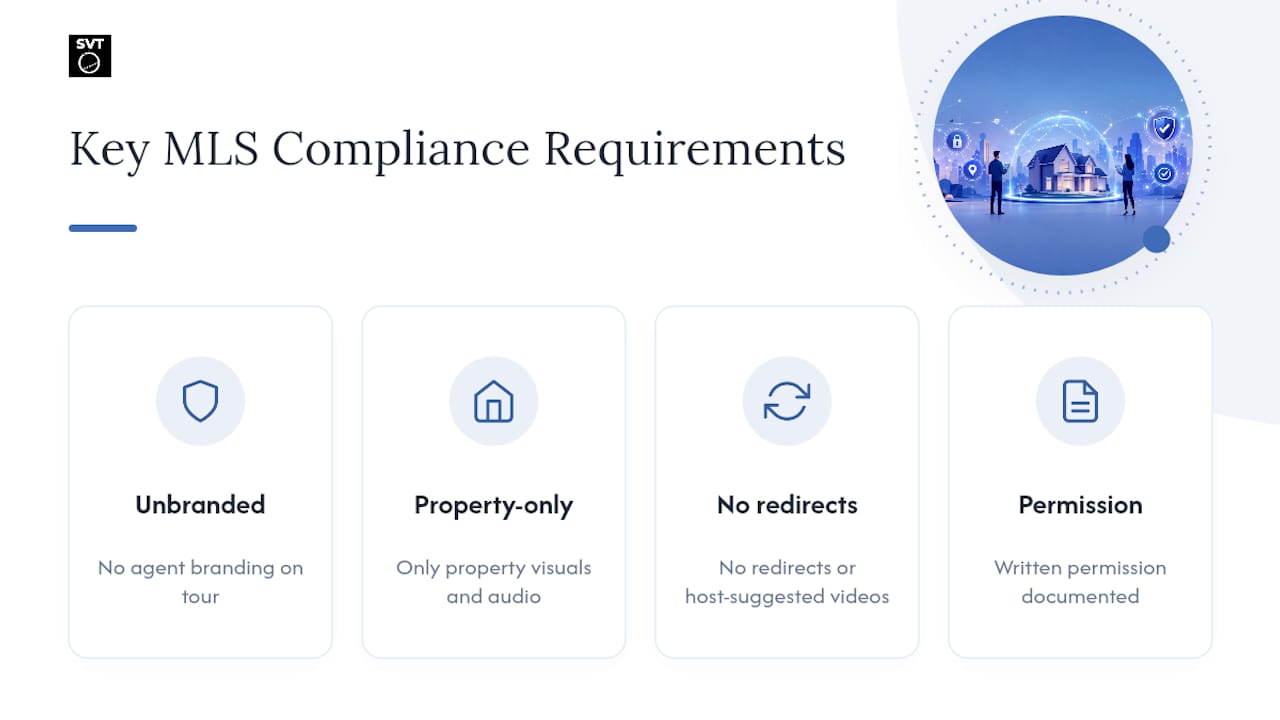
Most MLS compliance guides read like legal disclaimers stitched together from a dozen boards, and that's exactly why agents keep getting corrections on tours they thought were fine. The rules themselves aren't complicated. Unbranded, property-only, no redirects, documented permission. What's overrated is the assumption that content is where compliance fails. It usually isn't. It's the hosting platform quietly injecting a profile link or a suggested-video panel you never noticed.
The conventional advice tells agents to "double-check MLS rules," which is true and useless in the same breath. What actually works is treating the hosting choice as the first compliance decision, not an afterthought after the tour is shot and edited. If your host adds anything you didn't put there yourself, ads, share buttons, autoplay suggestions, you've already introduced risk before a human reviewer even looks at your content.
Prioritize the platform first, the content rules second. Get the hosting right, and most of the rest of this checklist takes care of itself.
— Andrea
A Practical Next Step for Agents Handling Their Own Tours
If you've read this far, you already know the biggest compliance risk isn't your photography, it's your hosting setup. Simple Virtual Tour was built around that exact problem: a self-hosted deployment option that keeps your tour on infrastructure you control, free of the ads, profile links, and suggested-content panels that get social-video hosting rejected in the first place.

The platform suits agents who want unbranded, MLS-ready output without becoming a web developer to get there. You get an intuitive backend, exportable links built to survive syndication, and full control over branding, all without needing technical expertise to set it up. For agents coming out of this guide, that means fewer rejected submissions and less time spent chasing down why a link stopped working three weeks after a listing went live.
If you're ready to see how it handles your next listing, you can explore Simple Virtual Tour's plans and start building a tour that's compliant from the first upload.
Sources
- Virtual Tours - No links to other sites - NorthstarMLS
- What are the Virtual Tour Requirements?
- Virtual Tour FAQs - CRMLS Knowledgebase
- Section 5.8 Photographs and Virtual Tours – CVR MLS