

Virtual tours are immersive, interactive digital representations of physical spaces that allow event planners, stakeholders, and attendees to explore venues remotely before, during, and after an event. In hybrid event planning, where in-person and virtual audiences must receive equally engaging experiences, virtual tours serve as both a logistical tool and a participation equalizer. Platforms like Freeman Blue Echo, ICC Sydney's 360 Interactive Tour, and Cvent Attendee Hub have demonstrated that integrating virtual tours into hybrid event workflows reduces coordination friction, accelerates decisions, and closes the experience gap between on-site and remote participants. Understanding why virtual tours support hybrid event planning means recognizing them not as marketing extras, but as operational infrastructure.
Why virtual tours support hybrid event planning at the spatial level
The most underestimated benefit of virtual tours in hybrid event planning is what they do before a single attendee registers. Traditional venue assessment relies on static floor plans, photographs, and occasional site visits. These tools give planners a flat, incomplete picture of how a space actually flows, which leads to layout revisions, miscommunication between distributed teams, and budget overruns during physical setup.
Virtual tours replace that guesswork with shared spatial reference. Freeman Blue Echo offers photorealistic, measurement-grade 3D walkthroughs that teams can explore remotely months before show day. This means your AV team in Chicago, your sponsor coordinator in London, and your production lead on-site can all walk the same digital space and align on the same layout decisions simultaneously. Decisions and approvals happen faster before physical setup, directly saving budgets and schedules.
The practical gains go beyond convenience. When distributed teams can test multiple venue configurations inside a virtual model, they catch adjacency problems, sightline issues, and traffic bottlenecks that would otherwise surface only during load-in. Embedding virtual tours that mirror real site decision points replaces subjective guessing with a shared spatial reference that every stakeholder can access on demand.
- Walk the venue in 3D to assess scale, flow, and layout options without traveling
- Test multiple configurations iteratively before committing to physical setup costs
- Share the tour link with remote stakeholders to align on attendee journey design
- Use measurement-grade models to brief AV, production, and sponsor teams accurately
Pro Tip: Schedule a virtual walkthrough with all department leads at least eight weeks before the event. Use the tour as your single source of truth for layout decisions, and document every agreed change directly in the tour with annotated hotspots.
What makes virtual tours essential for equitable engagement

Hybrid events fail most often not because of technology, but because remote attendees feel like passive observers watching a broadcast rather than participants in a shared experience. This perception gap is the central challenge of hybrid event design, and virtual tours address it directly by giving remote participants spatial context and interactive agency.
Interactive engagement features like live Q&A, polling, and raffles create shared moments that prevent remote attendees from feeling sidelined. When these tools are embedded within a virtual tour environment, remote participants can navigate the event space, visit sponsor booths, and engage with content at their own pace. This mirrors the exploratory freedom that in-person attendees take for granted.
Research confirms the mechanism behind this effect. Hotspots, mini-maps, and narration guide users to explore actively, which measurably boosts satisfaction and revisit intention. A 2026 study also found that immersive presence mediates satisfaction in virtual tour experiences, meaning the psychological sensation of "being there" directly predicts how satisfied a participant feels. For hybrid event planners, this is the design principle that matters most.
A 3,000-person hybrid conference managed through Cvent with custom tracks and engagement tools kept virtual attendees actively connected for hours daily across multiple time zones. The virtual tour component gave remote participants a spatial anchor, reducing the disorientation that often causes drop-off in long hybrid programs.
- Embed hotspots linking to session content, sponsor information, and networking areas
- Use guided narration to orient remote attendees who are unfamiliar with the venue
- Connect virtual tour navigation to live interaction tools like polls and Q&A panels
- Design the virtual attendee journey as a parallel experience, not a reduced one
Pro Tip: Think of your virtual tour as the lobby of your hybrid event. Every remote attendee should land there first, get oriented, and then move through the experience with the same sense of direction that an in-person guest gets from physical signage.
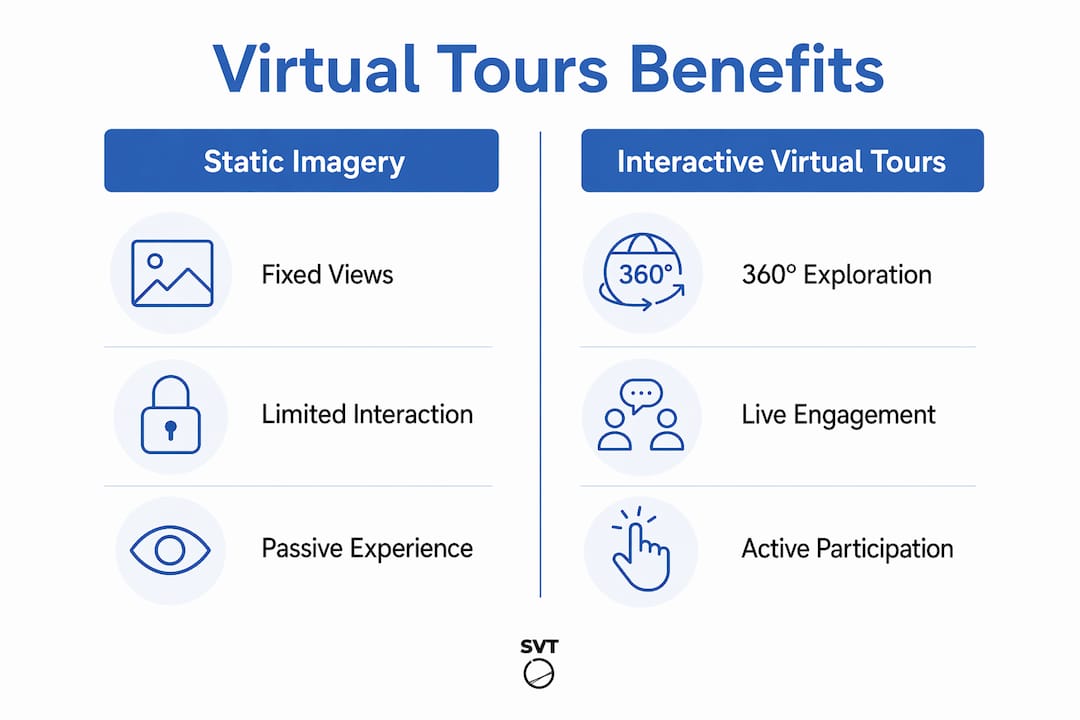
Static imagery vs. interactive virtual tours for hybrid event logistics
The difference between static imagery and interactive virtual tours is not just visual quality. It is the difference between a photograph of a map and actually walking the route.
| Feature | Static imagery | Interactive virtual tours |
|---|---|---|
| Spatial understanding | Limited to fixed angles and 2D layouts | Full 360° navigation with depth and scale |
| Team alignment | Requires interpretation and assumptions | Shared reference point for all stakeholders |
| Layout testing | Not possible without physical access | Multiple configurations testable remotely |
| Attendee engagement | Passive viewing only | Active exploration with hotspots and narration |
| Update flexibility | Requires new photography for each change | Digital updates applied instantly |
| Remote accessibility | Available but context-poor | Fully immersive and context-rich |
ICC Sydney's 360 Interactive Tour demonstrates what is possible at scale. The venue's immersive digital twin allows organizers to assess attendee flow, evaluate connectivity between spaces, and test layout options long before arriving on site. This is not a marketing showcase. It is a planning instrument that replaces multiple site visits and reduces the coordination loops that inflate pre-event costs.
For corporate organizers managing multi-room conferences or trade shows, the operational value is clear. A static floor plan tells you where the rooms are. An interactive virtual tour tells you how a delegate will actually move through the space, where bottlenecks will form, and whether your signage strategy will work. That level of insight is what separates reactive event management from proactive event design.
How to integrate virtual tours into hybrid event workflows
Integrating virtual tours into your hybrid event process is most effective when it starts early and stays connected to your other planning tools. Here is a practical sequence that works for both large conferences and corporate meetings.
-
Begin venue exploration in the virtual environment first. Before any site visit, use a virtual tour to evaluate the space for layout suitability, technical infrastructure, and attendee flow. This sets a baseline that every subsequent decision can reference.
-
Embed the tour inside your centralized event hub. Platforms like Cvent Attendee Hub allow you to integrate virtual tours alongside registration, schedules, and interaction tools. This prevents fragmented experiences and keeps remote attendees oriented within a single digital environment.
-
Use the tour as a shared briefing tool for production and sponsors. Send the tour link to your AV team, catering coordinator, and sponsor representatives before any planning call. When everyone has walked the space digitally, briefing calls become faster and more specific.
-
Build interactive features that serve both planning and engagement goals. Hotspots can mark technical requirements for your production team during planning, then be repurposed as content links for attendees during the event. Live virtual guided tours add a human layer that static tours cannot replicate, particularly for VIP attendees or sponsor walkthroughs.
-
Conduct a post-event review using the virtual tour. After the event, walk the space digitally with your team to evaluate what worked and what did not. This creates a documented spatial record that informs your next planning cycle.
Pro Tip: When building your virtual tour for a hybrid event, add at least three types of hotspots: informational (for attendees), technical (for your production team), and navigational (for remote participants who need wayfinding support). This single tour then serves three different audiences without requiring separate assets.
Hosting live virtual venue tours for sponsors and key stakeholders before the event also builds confidence and reduces last-minute change requests. When sponsors can walk their booth location virtually, they arrive on-site with clear expectations.
Key takeaways
Virtual tours support hybrid event planning by replacing static, assumption-heavy venue assessment with shared, interactive spatial references that serve both planning teams and remote attendees equally.
| Point | Details |
|---|---|
| Spatial alignment starts early | Use virtual tours in the first planning phase to align distributed teams on layout and flow before committing budgets. |
| Equitable engagement requires interactivity | Hotspots, narration, and live interaction tools transform remote attendees from observers into active participants. |
| Interactive tours outperform static imagery | 360° navigation provides depth, scale, and layout-testing capability that photographs cannot match. |
| Unified hubs prevent fragmentation | Embedding virtual tours inside platforms like Cvent keeps schedules, registration, and engagement in one place. |
| Tours serve multiple audiences | A single well-built virtual tour can brief production teams, orient sponsors, and engage remote attendees simultaneously. |
What I've learned from using virtual tours in hybrid event planning
I have worked with event teams that treated virtual tours as a nice-to-have, something to add to the event website for visual appeal. The teams that got the most value from them were the ones who used them as decision tools from day one of the planning cycle.
The shift I noticed most clearly was in stakeholder alignment. When everyone on a distributed planning team has walked the same digital space, the quality of planning conversations changes. You stop spending the first twenty minutes of every call establishing shared context. You start from a common reference point and move faster to decisions.
The remote attendee experience improvement is real, but it requires intentional design. Simply embedding a 360° tour and calling it a virtual experience is not enough. The tours that actually reduced drop-off rates and improved satisfaction scores were the ones built with guided navigation, purposeful hotspots, and direct connections to live interaction tools. The technology is only as good as the experience design behind it.
One mistake I see repeatedly is treating the virtual tour as a separate workstream from the rest of event planning. The teams that get the best results integrate the tour into their production schedule, their sponsor briefing process, and their attendee communication plan. When the tour is woven into the fabric of the event rather than bolted on at the end, it performs like the operational asset it is designed to be. Do not wait until two weeks before the event to build it. Build it when you book the venue, and let it do the work of aligning your team from that point forward.
— Andrea
Build your hybrid event virtual tour with Simple Virtual Tour
Simple Virtual Tour gives event planners and corporate organizers the tools to create unlimited, customizable virtual tours without needing technical expertise.
With features including live session capabilities, interactive hotspots, guided narration, and an intuitive backend, Simple Virtual Tour is built for the exact workflows described in this article. You can embed tours directly into your event hub, share them with distributed planning teams, and update them instantly as layouts change. The platform supports both cloud-hosted and self-hosted deployments, giving you full control over your data and reducing ongoing costs. Over 1,400 users already rely on it to create professional virtual experiences that serve planning teams and attendees alike. Create your first tour and see how it fits your next hybrid event.
FAQ
What is a virtual tour in hybrid event planning?
A virtual tour is an interactive, 360° digital representation of a physical venue that allows event planners and attendees to explore the space remotely. In hybrid event planning, it serves as both a logistical planning tool and an engagement asset for virtual participants.
How do virtual tours improve hybrid event logistics?
Virtual tours allow distributed planning teams to walk a venue digitally, test layout configurations, and align on decisions before physical setup begins. Platforms like Freeman Blue Echo provide measurement-grade 3D models that reduce coordination loops and prevent costly rework.
Can virtual tours replace site visits for event planners?
Virtual tours significantly reduce the need for multiple site visits by providing photorealistic spatial context that teams can access remotely at any time. They do not fully replace a final on-site walkthrough, but they eliminate most of the exploratory visits that consume planning budgets.
How do virtual tours help remote attendees feel more engaged?
Research shows that interactivity and user control in 360° tours increase behavioral engagement and satisfaction. When remote attendees can navigate a virtual venue, visit sponsor areas, and interact with live tools, they experience the event as participants rather than viewers.
What features should a hybrid event virtual tour include?
The most effective hybrid event virtual tours include hotspots linked to session content or sponsor information, guided narration for orientation, mini-maps for wayfinding, and direct integration with live interaction tools like polls and Q&A. These features serve both the planning team and the remote attendee audience simultaneously.