

Virtual tour student engagement strategies are methods used to enhance student learning and involvement through thoughtfully designed, interactive virtual tours that combine purposeful instruction, social collaboration, and immersive technology. The key distinction between a tour that educates and one that merely entertains lies in design. Research confirms that telepresence and enjoyment drive behavioral engagement more than immersion levels alone, even in a study of 297 students. That finding reframes the entire conversation: the technology matters less than how you structure the experience around it. Simple Virtual Tour gives educators the tools to build that structure without requiring technical expertise.
What are the best virtual tour student engagement strategies?
Effective virtual tour student engagement strategies start with one non-negotiable principle: active learning beats passive viewing every time. A student who watches a 360° walkthrough without any task or prompt retains far less than one who is given a specific role, a question to answer, or a problem to solve. Purposeful instructional organization is perceived as more valuable by students than low-structure tours, regardless of visual quality. That means the design decisions you make before a student ever clicks "play" determine most of the outcome.
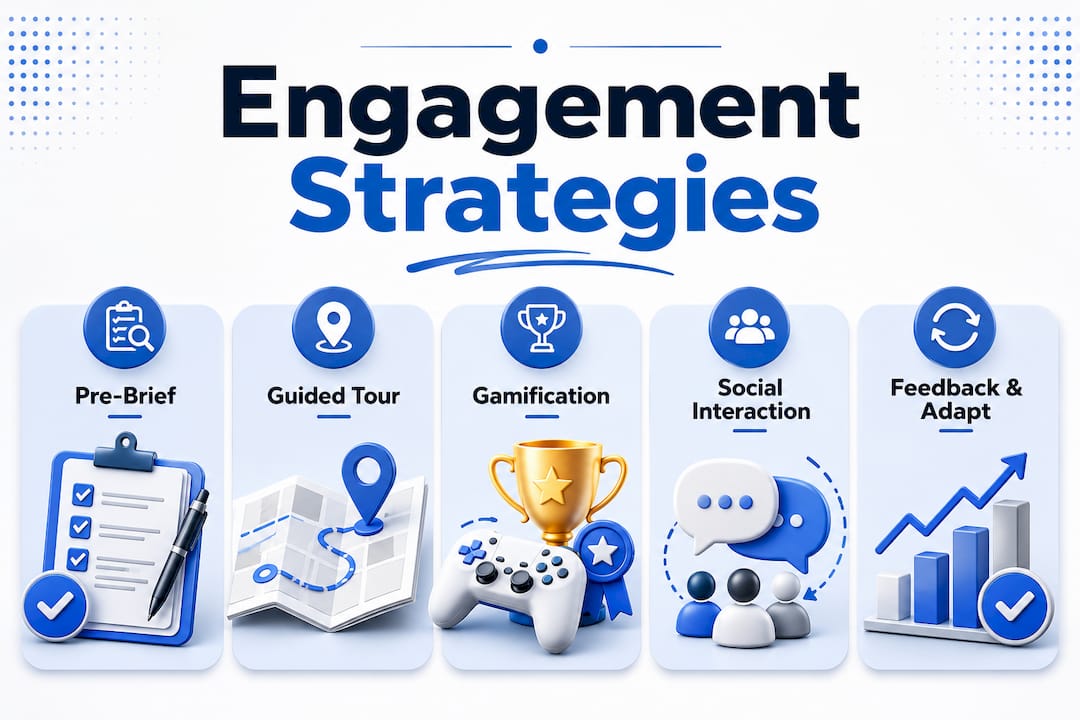
The most reliable framework for structuring a virtual tour follows three stages. Each stage serves a distinct cognitive purpose and keeps students oriented throughout the experience.
- Pre-brief (5–10 minutes): Set the context before students enter the tour. Assign roles, state the learning objective clearly, and give students a specific question to answer or a task to complete. This prevents the "ooh shiny" effect, where students click around without purpose.
- Guided exploration (15–30 minutes): Students move through the tour with hotspots and prompts that focus their attention on specific details. Hotspot labels should be descriptive and meaningful, not just "click here." A label like "Identify the fire suppression system and note its location" produces richer engagement than a generic marker.
- Debrief (15–25 minutes): Students report findings, compare observations, and connect the tour to course content. This stage is where retention solidifies. Without it, the experience fades quickly.
Balancing flexibility with guidance is a real tension in tour design. A fully linear tour can feel restrictive, while a completely open tour produces aimless browsing. The best approach gives students two or three defined pathways through the space, each tied to a different learning objective. This "choose-your-path" model preserves autonomy while keeping students on task.
Pro Tip: Write your hotspot labels as questions or directives, not descriptions. "What safety hazard exists near this workstation?" outperforms "Safety hazard area" every time.

How does gamification increase engagement in virtual tours?
Gamification increases student engagement by 20–35% when structured challenges and immediate feedback replace passive observation. That range is significant. It means a well-designed gamified tour can move a disengaged student into active participation without changing the underlying content at all. The mechanism is straightforward: challenge plus feedback creates a loop that keeps attention focused.
The most effective gamified elements for virtual tours in higher education include:
- Role-based tasks: Assign each student a specific role before the tour begins. A "safety auditor" looks for hazards. A "historian" documents how the space has changed over time. A "systems analyst" maps the flow of equipment or processes. Role-based navigation reduces aimless browsing and produces richer post-tour discussions.
- Timed challenges: Give students a set window to find and document a specific number of hotspot details. Time pressure sharpens focus without adding stress when the stakes are low.
- Immediate feedback prompts: Embed short quiz questions directly into hotspots. When a student answers correctly, the tour confirms it and adds context. When they answer incorrectly, the tour redirects them without penalty.
- Collaborative scoring: Small groups compete to identify the most details or submit the most complete report. This works especially well in orientation programs and lab tours.
AI-driven interactivity takes this further. Platforms that use AI to personalize education delivery can adjust the difficulty of prompts based on a student's prior responses, creating a more responsive experience. The key is to balance challenge with accessibility. A student who cannot navigate the interface will disengage before the gamification even registers.
Pro Tip: Start with one gamified element per tour, not five. Complexity added too quickly overwhelms students and defeats the purpose. Master one mechanic, measure the response, then add the next.
How do you build social presence in a virtual tour?
Virtual tours alone do not generate sufficient social connection. Explicit design for social collaboration is required because virtual environments lack the natural social cues that physical spaces provide. A student exploring a tour alone, without any peer interaction built into the experience, is at real risk of disengagement. The fix is not more technology. It is deliberate design.
Practical strategies for embedding social presence include:
- Breakout group assignments: Divide students into small groups before the tour. Each group receives a different role or a different section of the space to analyze. Groups then share findings in a debrief session.
- Peer annotation tasks: Students leave comments or observations at specific hotspots that their peers can read and respond to. This creates an asynchronous dialogue within the tour itself.
- Discussion prompts tied to specific locations: Rather than a general post-tour discussion, anchor questions to specific rooms or features. "Based on what you saw in the lab's storage area, what would you change about the current layout?" produces more specific and useful responses.
- Live guided sessions: Live virtual tour sessions allow an instructor or guide to move through the space in real time while students follow and ask questions. This format replicates the social dynamics of a physical field trip more closely than any asynchronous alternative.
The role of virtual tours in school orientation programs benefits enormously from this social layer. New students who explore a campus together, even virtually, report stronger feelings of belonging than those who explore alone. That outcome is not accidental. It requires designing the tour to prompt interaction at every stage.
What technology platform works best for student engagement?
The choice between immersive VR and 360° photo tours affects engagement, but not in the way most educators expect. Immersive VR produces stronger ratings in presence, emotional involvement, and engagement compared to desktop or 360° photo tours. However, VR headsets carry higher costs and create accessibility barriers for students who experience motion sensitivity or do not have access to the hardware.
| Format | Engagement level | Cost | Accessibility |
|---|---|---|---|
| Full VR headset tour | High | High | Limited |
| 360° photo tour (desktop) | Moderate | Low | Broad |
| 360° tour with live session | Moderate to high | Low to moderate | Broad |
360° photo tours remain the most practical option for most higher education institutions. They deliver moderate engagement, work on any device with a browser, and cost a fraction of full VR production. The gap in engagement between formats narrows significantly when the 360° tour is designed with strong instructional scaffolding, gamified elements, and social tasks. Technology novelty fades quickly. Storytelling and cultural narrative create lasting engagement long after the novelty of the format wears off.
Accessibility is not optional. Tours must include captions for audio elements, keyboard navigation for students who cannot use a mouse, and alternative text for hotspot labels. These features also improve the experience for all students, not just those with disabilities. Iterative improvement based on student feedback is the most reliable path to a tour that consistently performs well across different cohorts.
Pro Tip: Run a brief usability test with three to five students before launching any tour to a full class. You will catch navigation problems and confusing prompts that are invisible to the designer.
For educators exploring interactive campus tour features, the 360° format with embedded interactivity offers the best balance of reach and depth.
Key Takeaways
Effective virtual tour student engagement requires structured instructional design, gamified interactivity, and explicit social collaboration built into every tour from the start.
| Point | Details |
|---|---|
| Instructional structure drives outcomes | Use a pre-brief, guided exploration, and debrief to keep students focused and improve retention. |
| Gamification boosts engagement measurably | Structured challenges and immediate feedback increase engagement by 20–35% compared to passive tours. |
| Social design is not optional | Virtual environments lack natural social cues; embed peer tasks and live sessions to prevent isolation. |
| Telepresence outweighs technology | A well-designed 360° tour with strong prompts outperforms a poorly designed VR experience every time. |
| Accessibility expands reach | Captions, keyboard navigation, and clear hotspot labels make tours effective for every student. |
What most educators get wrong about virtual tour design
The most common mistake I see is treating a virtual tour as a finished product rather than a living teaching tool. Educators spend weeks on the visual production and then launch the tour with a single instruction: "Explore this space." That approach produces exactly the aimless browsing the research warns against. The tour looks impressive. The learning outcomes are thin.
The second mistake is underestimating how fast novelty fades. A student who finds a 360° tour exciting in week one of a semester will find it unremarkable by week four if nothing about the experience has changed. The tours that sustain engagement are the ones that change with the course. New hotspot questions tied to current lecture content, updated role assignments, and fresh discussion prompts keep the experience relevant. This is not a heavy lift. It requires ten minutes of updates per week, not a full redesign.
The third mistake is skipping the debrief. Educators who run tight schedules often cut the debrief to save time. That is the wrong trade-off. The debrief is where students connect the tour to the course framework, surface misconceptions, and consolidate what they observed. Cutting it saves fifteen minutes and costs most of the learning value.
The future of this space belongs to tours that combine AI-driven feedback for educators with strong narrative design. The technology will keep improving. The educators who build strong instructional habits now will be the ones who use that technology well when it arrives.
— Andrea
Simple Virtual Tour for higher education engagement
Educators who want to put these strategies into practice need a platform that handles the technical side without getting in the way of the teaching.
Simple Virtual Tour is built for exactly that. The platform lets you create unlimited interactive virtual tours with hotspots, embedded prompts, and live session capabilities, all from an interface that requires no coding or technical background. Over 1,400 educators and administrators already use it to build tours that go beyond passive viewing. The self-hosted option gives institutions full control over their data, which matters for schools with strict data governance requirements. Whether you are building a lab orientation, a campus walkthrough, or a cultural site tour for a history course, Simple Virtual Tour gives you the structure to make it work.
FAQ
What makes a virtual tour educationally effective?
A virtual tour becomes educationally effective when it combines a clear learning objective, structured exploration prompts, and a debrief phase. Research shows that purposeful instructional organization drives better attention and retention than visual quality alone.
How much does gamification improve student engagement in virtual tours?
Structured gamification with challenges and immediate feedback increases student engagement by 20–35% compared to passive tour models. Role-based tasks and timed challenges are among the most effective formats for higher education.
Can virtual tours replace physical field trips?
Virtual tours do not fully replace physical field trips, but they serve as effective supplements and off-season engagement tools. They allow institutions to showcase spaces in ideal conditions when physical access is limited or logistically difficult.
How do you add social interaction to a virtual tour?
Embed peer annotation tasks, assign breakout group roles before the tour begins, and use live guided sessions to replicate the social dynamics of a physical visit. Virtual tours alone lack natural social cues, so collaboration must be designed in explicitly.
What is the best format for a virtual tour in higher education?
360° photo tours with embedded interactivity offer the best balance of engagement, cost, and accessibility for most institutions. Full VR headset tours produce higher presence ratings but carry significant cost and hardware barriers.