

Virtual tour booking integration in tourism is the process of embedding a live booking engine directly inside an interactive virtual tour, so visitors can reserve a spot the moment their interest peaks. Done right, this approach increases conversion rates by 16% to 67%, with some tour segments reporting a 38% rise in confirmed bookings. That gap between browsing and buying closes because the customer never has to leave the experience to complete a transaction. Simple Virtual Tour supports this model with e-commerce integration built into its platform, giving tourism agencies a direct path from immersive content to confirmed revenue, without paying commissions on every sale.
What does virtual tour booking integration in tourism require?
Effective virtual tour booking integration starts with the right technical foundation. Your booking system must support either a public API or a native widget that embeds inside a virtual tour environment. Without that connection, you end up with a visual experience that impresses visitors but cannot capture their intent at the critical moment.
Core software requirements
The booking engine you choose needs to handle multi-currency pricing, tax calculation, and agent or B2B account modes. Agent and B2B booking modes allow travel trade partners to confirm reservations without requiring upfront guest payment, which is essential for scaling through agency networks. If your system cannot support deferred payment flows, you cut yourself off from a significant wholesale channel.

Real-time inventory synchronization is equally non-negotiable. Managing inventory state across your own website, online travel agencies, and partner networks requires a central channel manager. Real-time inventory sync prevents double bookings and the platform penalties that follow them. A single overbooking incident on a major OTA can trigger ranking drops that take months to recover from.
Typical pricing benchmarks
Specialized tour management platforms charge around $35 per month plus a $139 setup fee, with commissions ranging from 1% to 10% on each booking. That commission structure matters most when you are scaling volume. Operators who route bookings through a direct engine retain 100% of revenue on those sales, while OTA-sourced bookings carry the platform's standard cut. Understanding self-hosted cost savings becomes relevant here, since a self-hosted virtual tour platform removes recurring SaaS fees entirely.
Pro Tip: Before signing any booking software contract, confirm whether the platform charges a per-booking commission on top of the monthly fee. Some providers advertise low monthly rates but recover margin through transaction fees.
| Feature category | Why it matters | Typical cost range |
|---|---|---|
| API or widget embed | Connects virtual tour to booking engine | Included or $0–$50/month add-on |
| Channel manager | Syncs inventory across OTAs and direct | $30–$100/month |
| Agent/B2B mode | Enables wholesale bookings without upfront payment | Often included in mid-tier plans |
| Multi-currency support | Serves international travelers accurately | Included in most platforms |
| Payment processing | Captures revenue at point of interest | 1.5%–3% per transaction |
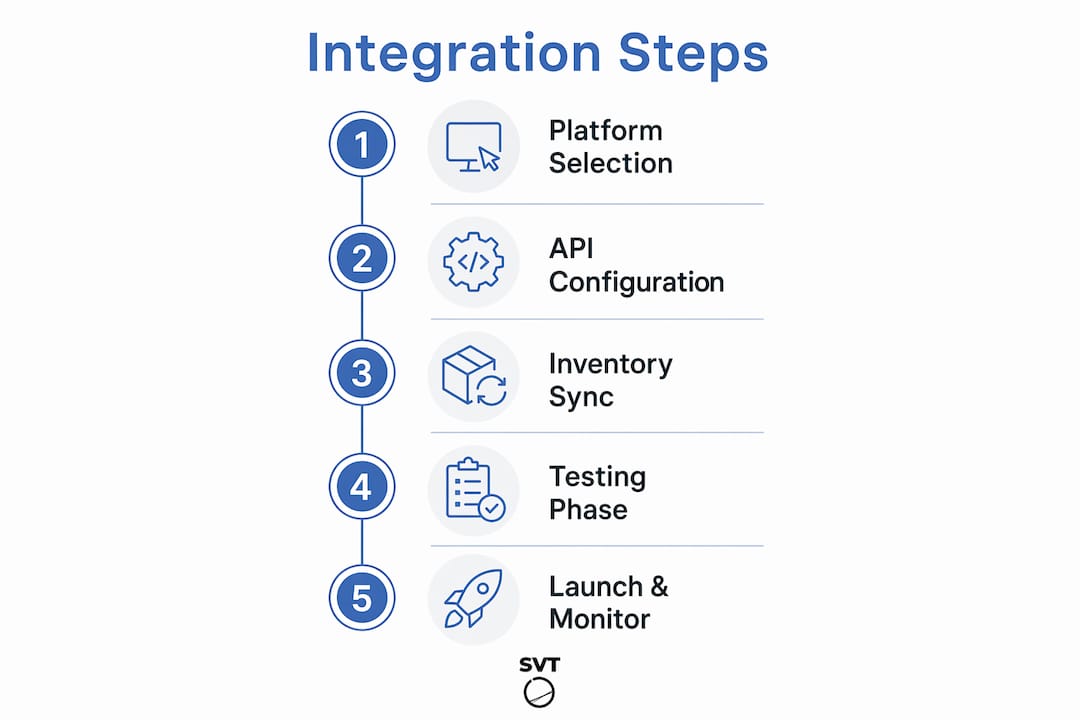
How do you implement virtual tour booking integration step by step?
Implementation follows a clear sequence. Rushing any stage creates gaps that show up as broken booking flows or inventory errors at the worst possible time.
Step-by-step integration process
-
Select your virtual tour platform. Choose software that supports e-commerce or booking widget embeds. Simple Virtual Tour includes e-commerce integration natively, which removes the need for a separate middleware layer.
-
Choose your booking engine. Identify a tourism booking software that offers a public API or an embeddable widget. Confirm it supports real-time availability, multi-currency, and agent modes before committing.
-
Connect via API or widget. Use the booking engine's embed code or API credentials to link it to your virtual tour. Most platforms provide a JavaScript widget you paste into the tour's hotspot or overlay settings.
-
Configure your booking flow. Set up availability calendars, pricing tiers, and payment options inside the booking engine. Map each tour experience to the correct product ID so inventory updates automatically.
-
Sync your channel manager. Connect your OTA listings, direct website, and any B2B portals to the same central inventory pool. Centralizing bookings from multiple channels into one platform eliminates the manual errors that cause overbookings.
-
Test every booking path. Run test transactions in sandbox mode for each booking type: direct guest, agent, and OTA. Verify that availability updates in real time after each test booking.
-
Test payment processing. Confirm that payment gateways process correctly in each currency you support. Check that refund and cancellation flows work as configured.
-
Launch with a soft rollout. Open the integrated tour to a limited audience first. Monitor booking confirmations, inventory updates, and payment receipts for 48–72 hours before full launch.
Pro Tip: Keep a simple error log during your first two weeks post-launch. Note any booking that fails to sync across channels. Patterns in those failures usually point to a single misconfigured API field.
The e-commerce integration methods used in venue tours apply directly to tourism experiences. The core logic is identical: a customer interacts with a space, finds a moment of peak interest, and completes a purchase without leaving the experience.
| Implementation stage | Estimated effort | Common tools involved |
|---|---|---|
| Platform selection | 1–3 days | Virtual tour software, booking engine |
| API or widget connection | 2–5 days | Developer or no-code embed |
| Booking flow configuration | 1–2 days | Booking engine admin panel |
| Channel sync setup | 1–3 days | Channel manager |
| Testing and QA | 2–4 days | Sandbox environment, test cards |
| Soft launch and monitoring | 3–7 days | Analytics dashboard, error logs |
What common mistakes should you avoid in virtual tour booking integration?
The most expensive mistake tourism operators make is choosing a visual-only virtual tour tool. Visual-only tools lack booking integration and limit your ability to convert visitor interest into confirmed reservations. You end up with an impressive showcase that generates inquiries instead of bookings, and every inquiry requires manual follow-up.
Operational pitfalls that scale badly
- Manual inventory management. Updating availability by hand across multiple channels creates staff overhead and booking errors. Manual booking management risks overbookings that damage your reputation on OTA platforms.
- Ignoring agent and B2B modes. Many operators configure only direct consumer booking flows. This locks out travel agents and corporate buyers who need deferred payment options and commission tracking.
- Disconnected APIs. An API connection that is not monitored will eventually fail silently. A broken sync means your virtual tour shows availability that does not exist, leading to overbookings and refund requests.
- Skipping the test phase. Operators who launch without thorough testing in sandbox mode discover payment failures and inventory gaps in front of real customers.
"Centralizing inventory from multiple OTAs and direct channels into a single platform eliminates costly manual errors and overbookings." — Bókun Industry Insight
Pro Tip: Set up automated alerts inside your booking engine for any failed transaction or sync error. Most platforms support webhook notifications. Catching a broken API connection in minutes beats discovering it after 20 failed bookings.
Scaling from dozens of bookings per month to thousands requires that every process be automated from day one. Operators who build manual workarounds into their early workflow find those workarounds collapse under volume.
How do you optimize virtual tour booking integration for higher conversion?
Integrated virtual tours shorten customer decision cycles by placing the booking option at the exact moment a visitor is most engaged. That moment is inside the experience, not on a separate booking page reached after three clicks. Every additional step between interest and purchase reduces conversion.
Tactics that move the needle
- Place booking hotspots at high-engagement points. Identify which scenes in your virtual tour hold attention longest using your analytics dashboard. Position booking calls-to-action at those scenes, not at the tour's end.
- Offer multi-channel booking options. Let visitors book directly inside the tour, via your website's booking page, or through an agent. Each channel serves a different buyer type.
- Use analytics to monitor channel performance. Track which booking source delivers the highest average order value and the lowest cancellation rate. Shift marketing spend toward the best-performing channel.
- Add direct booking incentives. A small discount or added value for booking directly inside the virtual tour rewards the behavior you want and reduces OTA commission costs.
The choice between an all-in-one platform and a specialized virtual tour tool paired with a separate booking engine depends on your backend needs. All-in-one platforms versus specialized tools each have trade-offs: all-in-one solutions simplify management but may lack depth in virtual tour customization, while specialized combinations give you best-in-class tools at the cost of more integration work.
| Approach | Best for | Key trade-off |
|---|---|---|
| All-in-one platform | Operators wanting one vendor | Less customization in tour design |
| Specialized virtual tour plus booking engine | Agencies needing deep tour features | More integration effort upfront |
| Cloud-hosted virtual tour with API booking | Mid-size operators scaling fast | Ongoing API maintenance required |
| Self-hosted virtual tour with embedded booking | Operators prioritizing data control | Higher initial setup investment |
Interactive travel booking works best when the visual experience and the transaction are inseparable. Agencies that treat the virtual tour as a standalone marketing asset and the booking system as a separate tool consistently underperform those that integrate both from the start.
Pro Tip: Run an A/B test with your booking hotspot placement. Put the booking option at scene three in one version and scene seven in another. The data will tell you where your specific audience is ready to commit.
What I've learned about virtual tour booking integration after years in the field
The operators who struggle most with virtual tour booking integration are not the ones who chose the wrong software. They are the ones who treated the virtual tour and the booking system as two separate projects. They built a beautiful tour, then tried to bolt a booking engine onto it afterward. That sequence creates friction at every layer: the design, the user flow, and the API connection.
The operators who succeed plan the booking flow before they build the tour. They know which scenes will carry a booking hotspot, which customer types they are targeting, and whether they need agent modes before they write a single line of API configuration. That upfront clarity saves weeks of rework.
Agent and B2B booking modes are the most consistently overlooked feature in this space. Most tourism operators focus entirely on the direct consumer experience. But a significant share of bookings in many destinations flows through travel agents, corporate travel managers, and inbound tour operators. If your system cannot handle deferred payment and commission tracking, you are invisible to that channel.
The industry is moving toward more immersive and interactive virtual travel experiences, with VR booking interfaces beginning to emerge as a real option. That shift rewards operators who build their integration architecture cleanly now. A well-connected booking engine today is far easier to extend into new channels tomorrow than a patchwork of manual processes.
My honest recommendation: start with a platform that handles both the virtual tour creation and the booking connection in one place. Add complexity only when your volume and channel mix demand it.
— Andrea
How Simple Virtual Tour supports direct booking integration
Tourism agencies that want to move from visual-only tours to fully integrated booking experiences have a clear starting point with Simple Virtual Tour.

Simple Virtual Tour gives you unlimited interactive virtual tours with e-commerce integration built in, so you can attach booking options directly to your tour content without a separate middleware tool. The platform supports both cloud-hosted and self-hosted deployments, giving you control over your data and your costs. With over 1,400 active users and a live session capability that supports real-time engagement, it is built for agencies that need professional results without a developer on staff. Operators who route bookings through Simple Virtual Tour's direct integration retain 100% of their revenue on those sales. See the full feature set and pricing at Simple Virtual Tour.
FAQ
What is virtual tour booking integration in tourism?
Virtual tour booking integration in tourism is the process of embedding a live booking engine inside an interactive virtual tour. It lets visitors reserve a tour, activity, or experience without leaving the virtual environment.
How much does tourism booking software typically cost?
Specialized platforms charge around $35 per month plus a $139 setup fee, with commissions of 1%–10% per booking. Operators using direct booking engines can retain 100% of revenue on those sales.
How do I prevent double bookings when using multiple channels?
Real-time inventory synchronization through a central channel manager is the standard solution. Centralizing all OTA, direct, and agent bookings into one inventory pool eliminates the manual errors that cause double bookings.
Do I need agent and B2B booking modes for my virtual tour?
Yes, if any portion of your business flows through travel agents or corporate buyers. Agent modes allow bookings without upfront guest payment, which is the standard requirement for wholesale and B2B travel channels.
Can virtual tours actually increase booking conversion rates?
Integrating virtual tours into booking flows increases conversion rates by 16% to 67%, depending on the segment. The gain comes from placing the booking option at the moment of peak visitor engagement inside the experience.
Key takeaways
Virtual tour booking integration in tourism delivers the highest conversion gains when the booking engine is embedded inside the tour from the start, not added as an afterthought.
| Point | Details |
|---|---|
| Integration drives conversion | Embedding booking inside virtual tours increases conversion rates by 16%–67% versus separate booking pages. |
| Real-time sync is non-negotiable | A central channel manager prevents double bookings across OTAs, direct, and agent channels. |
| Agent modes unlock wholesale revenue | B2B booking modes with deferred payment are required to access travel agent and corporate buyer networks. |
| Direct bookings retain full revenue | Operators using direct booking engines keep 100% of sales, avoiding OTA commission cuts. |
| Plan the booking flow before building the tour | Designing the integration architecture upfront saves significant rework and reduces API errors post-launch. |