

Drag-and-drop tools let nontechnical creators assemble interactive venue tours visually, removing the need for code and cutting build time significantly, benefitting from advances in AI-assisted product building and idea validation. You place scenes, drop in hotspots, link rooms together, and preview the result in real time, all without touching a line of HTML or JavaScript.
TL;DR: Visual builders give you three immediate wins: no coding required, faster iteration through WYSIWYG feedback, and a publish-ready tour in a fraction of the time a developer-led build would take.
- A visual canvas lets you arrange 360° scenes by dragging them into position
- Prebuilt components (hotspots, media blocks, navigation arrows) replace hand-coded elements
- Real-time scene linking connects rooms visually so you spot broken paths before publishing
- One-click preview and publish removes the deploy-and-test cycle entirely
Table of Contents
- How drag-and-drop interfaces remove technical friction
- What features should you look for in a venue-tour builder?
- How to create a venue tour with drag-and-drop tools
- What concrete benefits do drag-and-drop builders actually deliver?
- When do drag-and-drop tools reach their limits?
- Which venue types benefit most from interactive tours?
- Why Simple Virtual Tour fits drag-and-drop venue tour needs
- A 60-second checklist for evaluating any drag-and-drop tool
- Key Takeaways
- The case for visual builders is stronger than most guides admit
- Simple Virtual Tour: build your first venue tour today
- Useful sources and further reading
How drag-and-drop interfaces remove technical friction
The core mechanism is simple: instead of writing configuration files or CSS, you work on a visual canvas where every element behaves the way you'd expect it to. Move a hotspot left, and it moves left on screen. Resize a media block, and you see the result immediately. This WYSIWYG feedback loop eliminates the guesswork that slows down code-based builds.
Prebuilt components are the other half of the equation. Rather than coding a booking button or an info panel from scratch, you drag one from a component library and configure it with a few clicks. For venue tours specifically, that means hotspots, floor-plan overlays, video embeds, and navigation menus are all available without writing a single function.
Drag-and-drop interfaces also align with natural hand-eye coordination, which lowers the learning curve for first-time builders. You manipulate scenes directly and spot linkage errors faster than you would in a menu-driven system where every change requires navigating nested settings panels.
- Visual canvas: arrange scenes spatially, not through config files
- Hotspot placement: click, drag, and position interactive markers on any surface
- Scene linking: draw connections between rooms and preview the path instantly
- Media blocks: drop in images, video, or 360° panoramas without format conversion steps
- Live preview: test the full tour experience before publishing
Pro Tip: Compress and resize your equirectangular images to platform-recommended dimensions before uploading. Unoptimized panoramas are the single most common cause of slow-loading tours, and fixing them after the build is far more disruptive than doing it upfront.
What features should you look for in a venue-tour builder?
Not every drag-and-drop tool is built for venue work. The right platform covers a specific set of capabilities that matter when you're showcasing a physical space to a client or guest.
Visual canvas and scene editor should support 360° equirectangular panoramas (JPG, PNG, or KTX2), smooth scene transitions, and configurable camera start views. Floor-plan navigation is a strong differentiator for multi-room venues.

Hotspot types determine how interactive your tour can be. Look for info hotspots (tooltips, HTML info windows), navigation hotspots (scene switching), and CTA hotspots (booking links, e-commerce, capacity calculators). A tool that only supports basic tooltips will limit your conversion options.
Deployment and data control is a decision many buyers overlook until it's too late. Cloud-hosted platforms handle infrastructure for you, which speeds setup. Self-hosted options give you full data ownership and can reduce ongoing costs, which matters for venues handling client data or operating under strict privacy requirements.
Additional features worth checking:
- Templates and theming: consistent branding across all tour scenes without rebuilding styles each time
- Live-guided tour capability: a host navigates the tour in real time for remote clients, a feature covered in depth in live virtual guided tours
- Analytics: scene-level engagement, hotspot click-throughs, and time-in-tour data
- Embed and export options: iframe embed, shareable link, or self-hosted code export
- Accessibility: keyboard navigation, screen-reader support, and accessibility setup for public-facing tours
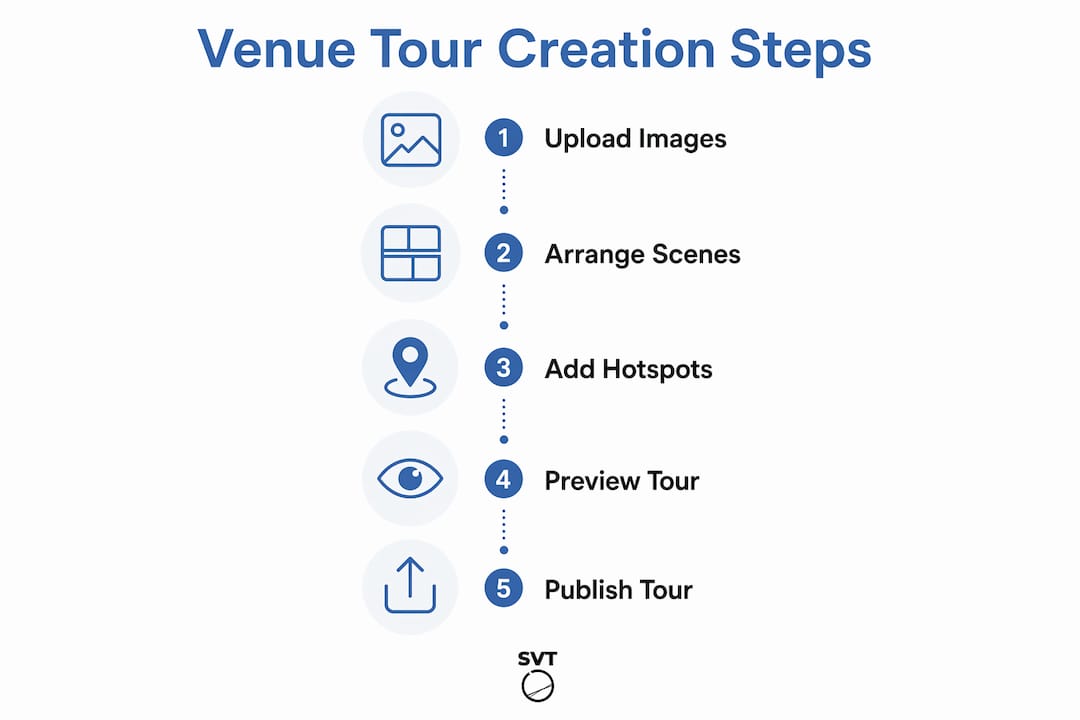
How to create a venue tour with drag-and-drop tools
Six steps take you from raw assets to a published, embeddable tour. The sequence is the same whether you're building for a wedding venue, a conference center, or a museum.
- Plan your content and shots. Map the rooms you want to include, decide on a logical visitor path, and note which spaces need booking CTAs versus informational hotspots.
- Optimize and import assets. Compress equirectangular panoramas to platform-recommended file sizes. Batch-upload using the builder's bulk import if available.
- Assemble scenes on the canvas. Drag each panorama into the scene editor, set camera start positions, and arrange the scene order to match your planned visitor path.
- Add hotspots and interactions. Place navigation hotspots to link rooms, drop in info hotspots for capacity or amenity details, and add CTA hotspots for booking or inquiry forms.
- Preview and test across devices. Use the builder's live preview on desktop, tablet, and mobile. Check that scene transitions are smooth and that all hotspot links resolve correctly.
- Publish and embed. Generate a shareable link or iframe embed code. For step-by-step embedding instructions, the guide on embedding a venue tour covers placement on event websites in detail.
Pro Tip: Keep your first published tour to five or six scenes. A smaller tour loads faster, is easier to test thoroughly, and gives you a working proof of concept you can expand once you've confirmed the workflow.
What concrete benefits do drag-and-drop builders actually deliver?
The headline benefit is speed. Drag-and-drop builders remove coding requirements and compress development cycles that would otherwise require a developer, a staging environment, and multiple review rounds. For venue professionals, that means a tour that might have taken weeks to commission and build can go live in days.
Beyond speed, the gains compound across the production cycle:
- Faster iteration: change a hotspot label or swap a panorama without touching code or filing a developer ticket
- Lower cost to publish: no ongoing developer retainer for routine updates
- Fewer configuration errors: visual workflows surface broken links and misplaced elements immediately, before a client sees them
- Easier updates: seasonal content swaps, new room additions, or rebranding take minutes rather than days
- Broader team access: marketing coordinators and venue managers can maintain tours without IT involvement
When evaluating a platform, look for vendor trust signals that indicate real-world adoption: published how-to guides, documented case studies, and a meaningful user base. These signals tell you the tool has been stress-tested in production environments, not just in demos.
When do drag-and-drop tools reach their limits?
Visual builders handle the vast majority of venue tour needs without friction. A few scenarios, though, genuinely require developer involvement.
- Heavy unoptimized media: a builder can't compensate for 50MB panoramas; performance tuning at the asset level is always a human task
- Custom booking pipelines: if your venue uses a proprietary reservation system with a non-standard API, connecting it to a tour hotspot usually requires custom integration work
- Advanced accessibility compliance: WCAG 2.1 AA conformance for public-sector venues often needs manual testing and remediation beyond what a builder's defaults provide
- Enterprise security or performance SLAs: strict uptime guarantees, SSO, or penetration-testing requirements typically push you toward a self-hosted deployment with custom configuration
Export and ownership are worth asking about during any demo. Some platforms generate portable code you can move to another host; others lock your tour to their infrastructure. For venues with long-term data-control requirements, that distinction matters before you commit.
Red flags that should trigger a developer conversation: a custom checkout flow inside the tour, a proprietary CRM with no documented API, or a performance SLA below 99.9% uptime on a self-hosted setup.
Which venue types benefit most from interactive tours?
Visual builders work across domains, and venue tours are no exception. Here's what each use case should prioritize:
- Event spaces and banquet halls: highlight layout flexibility, capacity by configuration (theater, banquet, cocktail), and available AV equipment; add a booking CTA hotspot on the main hall view
- Wedding venues: showcase ceremony and reception areas separately, outdoor spaces, and bridal suites; a video hotspot of a real event adds emotional context
- Conference centers: emphasize breakout room count, technical equipment, and accessibility; link a capacity table hotspot to each room
- Museums and cultural sites: use info hotspots to surface exhibit descriptions and audio guides; track time-in-tour to identify which exhibits hold attention longest
- Real estate and commercial properties: focus on natural light, square footage callouts, and neighborhood context; booking hotspots convert browsers to appointment requests
- Research labs and educational facilities: detail equipment, safety features, and access protocols; virtual lab tour strategies offer specific ideas for this niche
For measurement, track hotspot click-through rates on booking CTAs, average time-in-tour by scene, and live-guided tour attendance. These three metrics tell you which spaces generate interest and which need better presentation. The guide on communicating venue ambiance covers storytelling and media choices that improve those numbers.
Why Simple Virtual Tour fits drag-and-drop venue tour needs
Simple Virtual Tour is built specifically for the workflow described throughout this article: visual scene assembly, hotspot-driven interactivity, and flexible deployment without requiring technical expertise.
The platform's core feature set maps directly to the checklist above:
- Unlimited interactive tours with no per-tour publishing fee
- Live session capability for real-time guided walkthroughs with remote clients
- E-commerce integration so booking and purchase hotspots work inside the tour
- Analytics to track scene engagement and hotspot performance
- An intuitive backend accessible to nontechnical venue managers and content creators
- Cloud-hosted and self-hosted deployment options, giving you data control without sacrificing ease of setup
With over 1,400 users across real estate, tourism, and event sectors, the platform has been tested in production venue environments. Published resources, including the venue manager's setup guide, give you step-by-step support from first upload to embedded publish.
A venue manager using Simple Virtual Tour's drag-and-drop canvas can move from raw 360° panoramas to a fully hotspot-linked, embeddable tour without writing a single line of code, and without waiting on a developer's schedule.
A 60-second checklist for evaluating any drag-and-drop tool
Run through these questions during any demo or trial period:
- Visual canvas: Can you drag scenes directly onto a canvas and reorder them visually?
- Hotspot types: Does it support navigation, info, CTA, and e-commerce hotspots?
- 360° support: Does it accept equirectangular panoramas (JPG/PNG/KTX2)?
- Live-guided tours: Can a host navigate the tour in real time for a remote audience?
- Analytics: Does it report scene-level engagement and hotspot click-throughs?
- Publish options: Can you embed via iframe, share a link, or export code?
- Self-hosting: Is a self-hosted deployment available if data control is a priority?
- Performance: Does the demo tour load in under three seconds with optimized media?
- Accessibility: Does it support keyboard navigation and screen readers?
- Export/ownership: Can you export tour data or move it off the platform?
Scoring guide: 8–10 green answers means the tool fits most venue needs. 5–7 means it covers the basics but may require workarounds. Below 5, look at alternatives before committing.
Key Takeaways
Drag-and-drop venue-tour builders remove coding barriers, compress build time, and give nontechnical creators full control over interactive 360° experiences from a visual canvas.
| Point | Details |
|---|---|
| No-code visual workflow | Drag-and-drop interfaces eliminate coding and let you assemble scenes, hotspots, and navigation visually. |
| Faster iteration | Routine updates (new rooms, rebranded hotspots, seasonal content) take minutes without developer involvement. |
| Deployment choice matters | Cloud-hosted setups speed onboarding; self-hosted options give venues full data control and lower ongoing costs. |
| Six-step build process | Plan → optimize assets → assemble scenes → add hotspots → test across devices → publish and embed. |
| Simple Virtual Tour | Supports unlimited tours, live sessions, e-commerce hotspots, and both cloud and self-hosted deployment for over 1,400 users. |
The case for visual builders is stronger than most guides admit
Most articles about drag-and-drop tools focus on what they remove: the need for a developer, the long build cycle, the technical barrier. That framing is accurate but incomplete. What visual builders actually add is something more valuable: they put the person who knows the venue best, the manager, the coordinator, the content creator, directly in control of how that venue is presented.
A developer can build a technically correct tour. But the person who knows which corner of the ballroom catches the afternoon light, or which breakout room clients always ask about first, is rarely the developer. Drag-and-drop tools close that gap. The subject-matter expert becomes the builder, and the result is a tour that reflects real venue knowledge rather than a spec document interpreted at a distance.
The limitation worth taking seriously is not the tool's feature list. It's the quality of the assets going in. A visually polished builder cannot rescue a poorly lit panorama or a tour with no logical visitor path. Invest in the photography and the content plan first. The drag-and-drop workflow will handle the rest efficiently.
Simple Virtual Tour: build your first venue tour today
If you've worked through this guide and want to put the workflow into practice, Simple Virtual Tour gives you everything covered here in one platform. You get unlimited interactive tours, live-guided session capability, e-commerce and booking hotspot integration, and the choice between cloud-hosted convenience and self-hosted data control.

The setup is designed for venue professionals and content creators who need results without a development team. Published how-to guides walk you through every step, from first panorama upload to embedded publish on your event website. Start building your tour and have a working venue tour live faster than a developer quote would arrive.
Useful sources and further reading
- Simple Virtual Tour platform overview — hosting options, core features, and live-session capability
- Showcase Event Space Online Tour: A Venue Manager's Guide — step-by-step venue-specific setup and embedding workflow
- Embed a Venue Tour on Your Event Website — iframe embed instructions and placement best practices
- The Role of Live Virtual Guided Tours in 2026 — practical uses for real-time hosted walkthroughs
- Drag-and-Drop App Builder (Axonator) — industry review of no-code builder benefits and development time gains
- Visual Application Development (OutSystems) — documentation on prebuilt components and rapid prototyping
- How Drag-and-Drop Tools Simplify Workflows (Lumia Live Centre) — cross-domain workflow benefits and demo evaluation criteria
- Venue Showcase Digital Tools for Professionals — broader tool context for venue professionals in 2026